
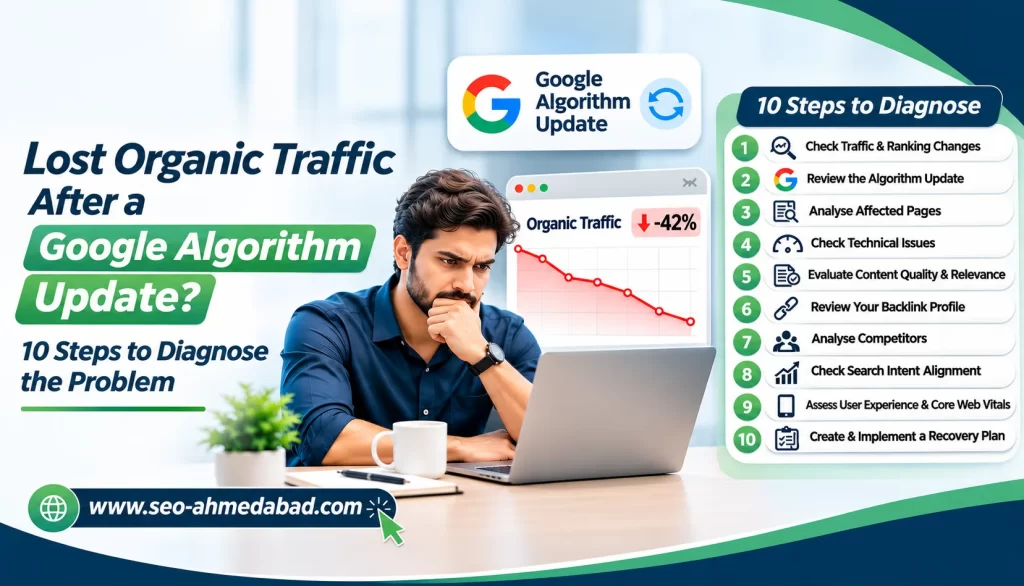
A sudden decline in organic traffic after a Google algorithm update can be concerning, especially when your website has maintained stable rankings for months. However, a traffic drop does not always mean your website has been penalised or that your entire SEO strategy has stopped working.
Google regularly updates its search systems to improve the relevance, quality, and usefulness of search results. These changes can affect keyword positions, page visibility, click-through rates, and the amount of organic traffic a website receives. The right response is to identify what changed, understand which pages and keywords were affected, and build a data-driven recovery plan.
What Should You Do After Losing Organic Traffic?
If your website loses organic traffic after a Google algorithm update, follow these steps:
- Check Google Search Console and GA4 to confirm the decline.
- Identify the date when traffic and rankings started falling.
- Compare affected pages and keywords before and after the update.
- Check whether the decline affects your entire website or specific sections.
- Review content quality, search intent, technical SEO, and backlinks.
- Compare your pages with competitors that gained visibility.
- Update outdated or unhelpful content with useful information.
- Improve internal linking, page experience, and site performance.
- Monitor ranking and traffic changes after making improvements.
- Develop a long-term SEO recovery strategy rather than making rushed changes.
A Google algorithm update recovery process should be based on evidence, not guesswork. Start by diagnosing the actual cause before changing your website.
10 Steps to Diagnose and Recover Lost Organic Traffic
1. Confirm the Traffic Drop Using Reliable Data
Before making changes, verify whether your website has genuinely lost organic traffic. Open Google Analytics 4 and Google Search Console to review performance trends.
In GA4, compare organic search sessions across the affected period. In Google Search Console, examine clicks, impressions, average position, and click-through rate.
Compare equivalent time periods, such as the 28 days before and after the decline. Also compare year-over-year data where seasonal demand may influence results.
Check whether the decline is limited to Google organic search or affects other traffic channels as well. This helps determine whether the issue is related to search visibility or a broader website problem.
2. Identify the Google Update Timeline
Check Google’s official Search Status Dashboard to identify whether a core update, spam update, or another confirmed search incident occurred around the time your traffic declined.
Record the update’s announcement date, rollout period, and completion date. Compare these dates with your Search Console performance data.
A decline occurring during an update does not automatically prove that the update caused it. Other factors, including seasonality, technical errors, competitors, and changes in search demand, may also contribute.
3. Find the Pages and Keywords That Lost Visibility
Do not focus only on total website traffic. Identify the specific URLs and search queries responsible for the decline.
In Google Search Console:
- Open the Performance report.
- Compare the affected period with the previous equivalent period.
- Review the Pages and Queries tabs.
- Identify URLs with significant click and impression losses.
- Check which keywords experienced position changes.
Create a list of your most affected landing pages. This will help you prioritise pages with the greatest business value and recovery potential.
4. Analyse the Google Core Update Impact
A Google core update can change how Google’s systems assess and rank content. Some pages may lose visibility while other pages gain rankings, even when no technical issue is present.
Review the pages that declined and compare them with pages that maintained or improved their positions. Look for differences in content depth, originality, accuracy, expertise, and usefulness.
Ask whether your pages answer users’ questions clearly and provide information that is genuinely helpful. Avoid assuming that adding more words or inserting additional keywords will automatically improve rankings.
5. Review Content Quality and Search Intent
Content that no longer satisfies search intent may struggle to maintain visibility. Review each affected page to determine whether it provides a complete and relevant answer to the user’s query.
Check for:
- Outdated facts, statistics, and recommendations.
- Repeated or generic information.
- Missing explanations of important topics.
- Unclear headings and poor content structure.
- Unsupported claims or unnecessary keyword repetition.
- Content that does not match the purpose of the search query.
Update pages with accurate information, useful examples, original insights, and clear explanations. Remove unnecessary content that does not help readers.
6. Check Technical SEO Issues
Technical problems can contribute to organic traffic losses, even when content quality is strong. Review your website for issues that may prevent Google from crawling, indexing, or understanding important pages.
Check the following:
- Indexing and crawl errors in Google Search Console.
- Incorrect canonical tags.
- Accidental noindex directives.
- Robots.txt restrictions.
- Broken internal and external links.
- Redirect chains and incorrect redirects.
- Duplicate or conflicting URLs.
- Mobile usability and page experience issues.
Use URL Inspection in Search Console to check important landing pages. Fix confirmed technical problems before making unnecessary content changes.
7. Analyse Competitors That Gained Rankings
Competitor analysis can help you understand why other websites are gaining visibility while yours is declining.
Identify websites that now rank above your affected pages for important keywords. Compare their content structure, topic coverage, page relevance, helpful examples, and overall user experience.
Look for useful information they provide that your page may be missing. Do not simply copy competitors. Instead, identify opportunities to create more accurate, original, and useful content that better satisfies search intent.
8. Review Backlink Quality and Website Authority Signals
Review your backlink profile to identify unusual changes, lost valuable links, or potentially harmful link patterns. Use reliable SEO tools to monitor referring domains, anchor text, and links pointing to important pages.
A decrease in backlinks does not automatically explain a ranking decline. Similarly, buying backlinks or removing links without proper investigation can create additional problems.
Focus on earning relevant, editorially placed links through useful resources, industry contributions, digital PR, and original research. Build your website’s credibility through consistent quality rather than shortcuts.
9. Improve Internal Linking and Content Structure
Internal links help visitors and search engines discover related pages across your website. Review whether important service pages, category pages, and blog articles receive relevant internal links.
Use descriptive anchor text that explains the destination page. Connect supporting articles to relevant main service or topic pages, and remove unnecessary links that create confusion.
Also improve headings, navigation, page layout, and readability. A clear content structure makes it easier for users to find information and understand the relationship between topics.
10. Monitor Results and Build a Long-Term Recovery Strategy
After implementing improvements, monitor your website regularly. Track organic clicks, impressions, keyword positions, indexed pages, conversions, and engagement trends.
Maintain a record of every significant content, technical, and internal linking change. This helps you understand which improvements may be contributing to positive or negative results.
SEO recovery can take time, and there is no guaranteed timeline for rankings to return. Avoid making several major changes at once without documenting them. Prioritise high-value pages, evaluate performance consistently, and refine your strategy using actual data.
Businesses that need structured support can consider SEO recovery services to investigate ranking losses, identify technical and content gaps, and prioritise corrective actions. SEO-Ahmedabad focuses on evidence-based SEO improvements that help businesses work towards stronger organic visibility and relevant search traffic.
How Long Does Organic Traffic Recovery Take?
There is no fixed recovery period after a Google algorithm update. The time required depends on the cause of the decline, the number of affected pages, the scale of improvements, and when Google recrawls and reassesses the updated content.
Some technical problems may be resolved after Google processes the corrections. Broader content and ranking improvements may require more time and can depend on future algorithm updates.
Rather than expecting immediate results, monitor trends over several weeks and months. Look for improvements in impressions, keyword visibility, relevant clicks, and conversions.
Conclusion
Losing organic traffic after a Google algorithm update does not mean your website cannot recover. The most important step is to understand why the decline happened before making changes.
Start with Search Console and GA4 data, identify affected pages, review content quality, check technical SEO, and analyse competitors. Then implement improvements gradually and monitor their impact.
A consistent, user-focused SEO recovery strategy can help address visibility problems and build a stronger foundation for long-term organic growth. SEO-Ahmedabad.com can help businesses evaluate ranking declines and plan practical improvements based on website performance, search intent, and SEO data.
Frequently asked question
Organic traffic may decline after a Google core update because Google's ranking systems reassess content relevance, quality, usefulness, and overall search intent. Competitor improvements, seasonal demand, and technical issues can also contribute to traffic losses.
Start by analysing Google Search Console and GA4 data. Identify affected pages and keywords, review content quality, check technical SEO issues, analyse competitors, and improve internal linking. Monitor performance regularly after implementing changes.
There is no fixed recovery timeline. Some issues may improve after corrections are processed, while broader ranking improvements can take longer and may depend on Google's future reassessments and updates.
No. A ranking decline after a Google core update does not automatically mean your website has received a penalty. Core updates involve changes to Google's ranking systems and may affect how pages perform in search results.
Consider SEO ranking recovery services when your website experiences a sustained decline in organic traffic, important keyword losses, or reduced search visibility. An SEO professional can investigate content, technical SEO, backlink, and competitor-related factors.
